


Content Research is the first of three specialized workflows available through GemPages MCP:
- Content Research: Turn product information and market evidence into customer insights, buyer personas, and draft content.
- Content to HTML: Turn a finished advertorial, listicle, or comparison article into a ready-to-preview HTML landing page.
- HTML to GemPages: Turn approved HTML into an editable page in GemPages.
Each workflow can be used independently. When used together, they provide a connected path from product research to finished content, HTML production, and an editable GemPages page.
The Content Research workflow focuses on the first stage. It can:
- Identify relevant competitors and analyze their positioning
- Collect customer reviews and marketplace feedback
- Uncover buyer motivations, pain points, and objections
- Build evidence-based buyer personas
- Generate advertorials, listicles, and comparison articles
- Evaluate each draft through a quality-control process
- Combine the research and content into a self-contained HTML report
To start, open Claude Code, Claude Cowork, or another compatible AI environment and enter a prompt such as:
Use GemCommerce MCP to research content for Marine Collagen Powder for the US market.
GemPages MCP is currently in beta.
Research is often the most fragmented part of creating a page. Product information sits in Shopify, competitor messaging is spread across different websites, and customer opinions live in reviews, marketplaces, and social discussions.
The Content Research workflow brings these sources into one connected process. It starts with your product, investigates the market and potential customers, and turns the findings into practical content your team can review and develop further.
How the Content Research Workflow Works
Instead of asking an AI agent to write product copy from a short description, the workflow first instructs it to investigate the product’s market and potential customers. Depending on source availability, it can examine:
- Competitor websites and product pages
- Competitor positioning and advertising
- Marketplace reviews
- Customer review platforms
- Social discussions
- Product information from Shopify
- Research files supplied by your team
The workflow then analyzes the collected information to understand:
- How competing products position themselves
- Which benefits competitors emphasize
- What customers like or dislike about existing options
- Which problems motivate customers to look for a solution
- What objections make them hesitate before purchasing
- How buyers naturally describe their experiences
- Which messages may resonate with different customer groups
Based on these findings, GemPages MCP develops buyer personas and generates content angles for each relevant audience.
The workflow does not replace human research or editorial judgment. It gives your team a more informed starting point than content generated from a product name or category alone.
What You Receive After Running the Full Research Workflow
A full Content Research run produces three main groups of deliverables: an HTML research report, multiple draft articles, and the supporting research files.
1. An HTML Report With All Research Findings
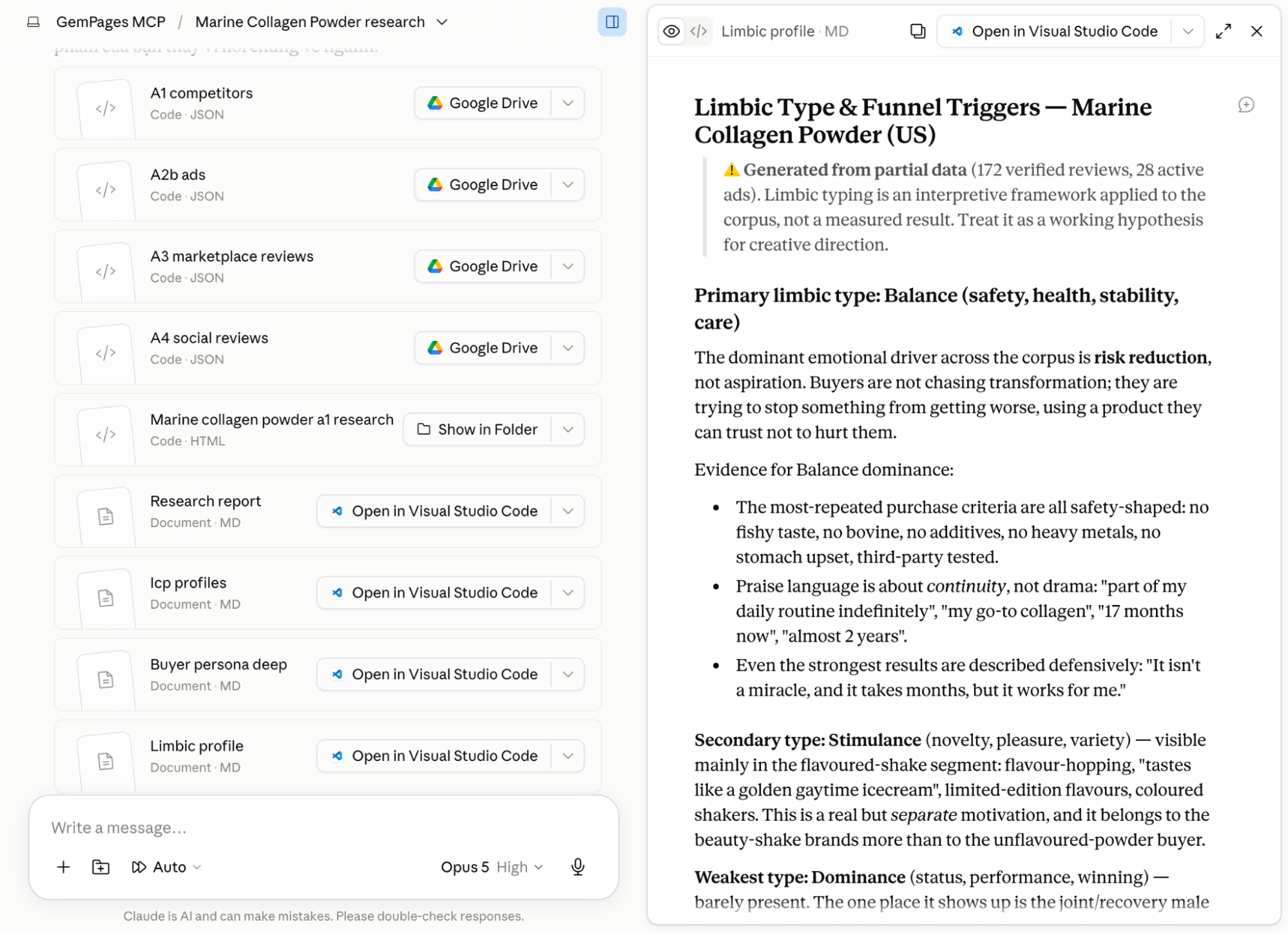
The primary deliverable is a self-contained HTML report that can be opened in a browser.
The report brings together the main findings and outputs from the workflow, including:
- The research timeline and progress
- Competitor findings
- Customer and marketplace reviews
- Audience insights
- Customer psychology analysis
- Buyer personas
- Generated articles
- Quality-control scores and feedback
This format allows your team to review the complete research without opening every working file individually.
It also makes the connection between the source evidence and the generated content easier to understand. Rather than reviewing an isolated article draft, you can see which customer problems, objections, and market patterns informed its angle.
2. At Least Seven Advertorials, Listicles, and Comparison Articles
A standard full run generates at least seven draft articles:
- Three persona-based advertorials
- Three persona-based listicles
- One comparison article
If the workflow identifies more than three meaningful buyer personas, it may create additional listicles for those audience segments.
Each format supports a different marketing objective.
Each draft passes through a quality-control stage before being added to the report. However, your team must still verify its facts, product claims, brand voice, and compliance before publication.
3. Source Files for Competitors, Reviews, Personas, and Content
GemPages MCP also creates the files used throughout the research process. Depending on the scope and available sources, these may include:
- Competitor lists
- Scraped competitor content
- Competitor advertising examples
- Marketplace reviews
- Social and customer reviews
- Audience research
- Customer psychology analysis
- Buyer-persona findings
- Generated article files
- Quality-control results
4 Ways to Start a Content Research Workflow
You do not need to run the complete pipeline for every task. GemPages MCP supports four research entry points based on the output you need.
|
Entry point |
Example instruction |
Best used when |
| Full research | “Do content research for [product].” | You need the complete research and article package |
| Competitors only | “Find competitors for [product].” | You need a focused overview of the competitive landscape |
| Reviews only | “Collect reviews for [product].” | You want to analyze customer language, sentiment, and objections |
| Report only | “Generate a research report for [product].” | You already have research data and need analysis and content drafts |
The full workflow is most useful for a new product launch, a major campaign, or a product category that requires deeper positioning work.
A shorter workflow is more efficient when you have a specific question. For example, there is no need to generate seven articles if you only want to identify the product’s closest competitors.
How to Run a Full Content Research Workflow Step by Step
You can run Content Research in Claude Code, Claude Cowork in Claude Desktop, or another compatible AI environment that gives GemPages MCP access to the required tools and local files. The interface may vary between clients, but the core process remains the same.
Before starting, follow our GemPages MCP setup guide to connect GemCommerce MCP to your preferred AI tool and Shopify store.
Step 1: Enter Your Product and Target Market
Open your supported AI client and explicitly ask it to use GemPages MCP.
You can identify the product with:
- A Shopify product URL
- A Shopify product ID
- A product name available in your connected store
- A plain-language description of a product that is not yet in Shopify
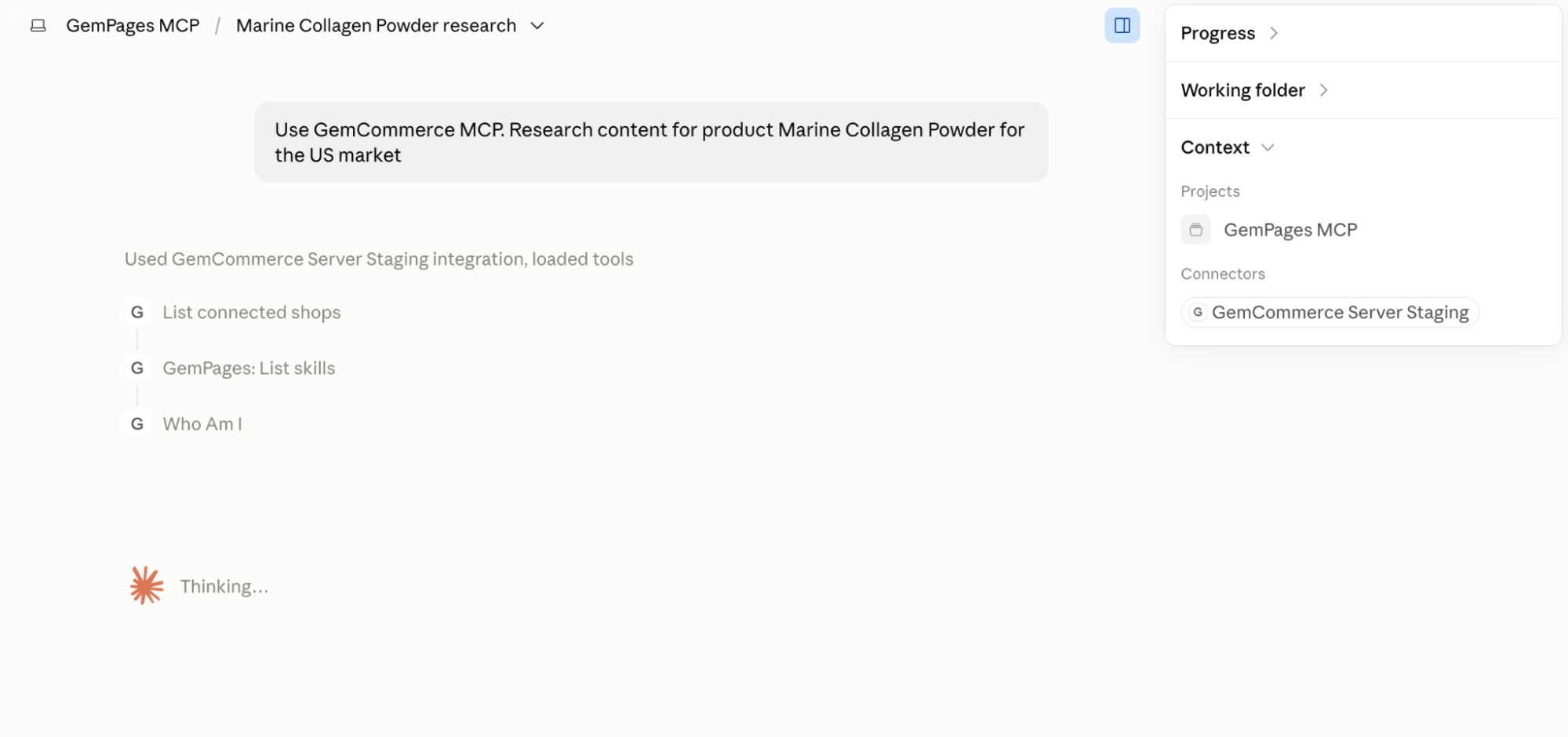
Here are a few realistic prompts you might actually type, and what each one tells the AI to do.
1. "Use GemCommerce MCP. Research content for product Marine Collagen Powder for the US market"
A full end-to-end run. Because a product URL is not included, the AI will search in your store to see if there’s matching product. Then the AI can pull the name, description, and price directly instead of asking you to describe it, so you’ll mostly just be confirming details and supplying reviews if it can’t find enough on its own.
2. "Use GemCommerce MCP. Research content for product Marine Collagen Powder for the US market — product link: https://mystore.myshopify.com/products/marine-collagen-powder.
- What makes it different: it’s the only one on the market sourced from wild-caught fish (not farmed), it’s third-party tested for heavy metals, and it comes with a 90-day money-back guarantee.
- Here are testimonials we’ve collected: [paste 8–10 customer quotes with names].
- Our main competitors are Vital Proteins, Sports Research, and Codeage
The best-case version of a full run, every input the flow can use is handed over up front: a real product link (so the AI doesn’t have to search or ask about basics), concrete differentiators, an already-collected batch of testimonials, guarantee details, and even named competitors.
With this much supplied, the AI can skip most of the confirmation back-and-forth in step 2 and go almost straight to execution steps, so the ~30-minute run is spent entirely on deep research rather than clarifying basics, producing the most specific, credible copy the flow can generate.
Step 2: Confirm Product Details and Differentiators
The AI agent may ask you to confirm details such as:
- Product name and category
- Target country or market
- Core features
- Primary customer group
- Price or price range
- Key differentiators
Review this information carefully because it influences every later stage, from competitor discovery to article generation.
You should also add important details that may not appear on the Shopify product page:
- Unique product features
- Proprietary ingredients or technology
- Certifications
- Third-party testing
- Guarantees or warranties
- Named competitors
- Usage instructions
- Product limitations
- Existing brand positioning
- Claims that must not be used
For example, “high-quality marine collagen” provides limited direction.
A stronger brief would explain that the collagen is sourced from wild-caught fish, tested for heavy metals, designed to dissolve in hot and cold drinks, and covered by a 90-day money-back guarantee.
Specific input makes it easier for the workflow to distinguish your product from generic alternatives.
Step 3: Let GemPages MCP Research and Generate the Content
After the necessary information has been confirmed, the AI agent can run the complete workflow.
During a full Content Research run, it may:
- Retrieve and organize the product information.
- Identify relevant competitors.
- Examine competitor pages, positioning, and available advertising.
- Gather reviews and customer discussions from accessible sources.
- Analyze recurring language, sentiment, motivations, and objections.
- Build audience segments and buyer personas.
- Generate advertorials, persona-based listicles, and a comparison article.
- Evaluate each article through a quality-control process.
- Assemble the research and content into an HTML report.
The AI agent should provide progress updates as it completes these stages.
A complete run can take up to 30 minutes because it prioritizes research depth over immediate output. Stay near the conversation during the first few minutes in case the agent needs permission to access a tool or file.
Step 4: Review the Research Report and Draft Articles
Once the workflow is complete, open the generated HTML report in your browser.
Start with the research findings before reading the generated articles. Check whether the report has identified:
- Competitors that are genuinely comparable to your product
- Customer problems that appear repeatedly across sources
- Meaningful differences between audience segments
- Objections that could prevent a purchase
- Product benefits buyers consistently prioritize
- Language customers use to describe their desired outcomes
- Gaps between your current positioning and market expectations
Next, determine whether the generated articles accurately reflect those findings.
A high quality-control score may show that an article follows the workflow’s structural and content requirements. It does not guarantee that every fact, claim, or strategic recommendation is correct for your brand.
What Information to Provide for More Accurate Research
GemPages MCP can organize and analyze a substantial amount of information, but its results still depend on the quality of your input and the evidence it can access.
1. Add Complete Product and Offer Details
At minimum, provide:
- A clear product description
- The target market
- Core features
- Primary differentiators
- Price or price range
- Intended customer
- Product guarantees
- Relevant certifications
Without this context, the workflow may understand the product category but fail to identify why your specific offer deserves attention.
Details about the complete offer are also important. Shipping policies, bundles, subscriptions, bonuses, warranties, and guarantees may influence the purchase decision as much as the physical product itself.
2. Provide Reviews From Your Own Customers
First-party testimonials, customer surveys, support questions, and post-purchase feedback are especially valuable because they reveal what your actual customers think.
Public reviews of competing products help explain the wider category. First-party evidence shows which of those patterns apply directly to your offer.
It may also reveal product-specific benefits or concerns that do not appear on competitor pages.
3, Identify Verified Features and Restricted Claims
Product features and marketing claims require different levels of verification.
For example, “made with wild-caught fish” is a sourcing feature that may be supported by supplier documentation. “Eliminates joint pain” is a health claim that requires appropriate evidence and may create regulatory concerns.
Tell the agent:
- Which features have been verified
- Which claims require qualification
- Which statements need supporting evidence
- Which claims must not appear in the content
This helps prevent uncertain information from being treated as an established product benefit.
4. Specify the Target Country, Audience, and Language
The same product can face different competitors, price expectations, and objections in the US, Germany, Japan, or Australia.
Specify the target country even if the final content will be written in English.
Where relevant, also include:
- Intended content language
- Customer age range
- Customer awareness level
- Product price position
- Main sales channel
- Traffic source
- Campaign objective
These details help the workflow produce research and content for the correct market context.
5. Upload Existing Customer or Market Research
You do not have to rely only on data collected through GemPages MCP.
If your team already uses a review scraper, customer survey, social-listening platform, analytics tool, or research service, export the relevant information and provide it to the AI agent.
For example:
Here are the customer reviews we collected for this category. Use these files instead of collecting new reviews, then complete the audience analysis and article-generation stages.
This allows GemPages MCP to apply its analysis and content workflow to research your team has already collected and validated.
Tips for Running the Content Research Workflow Without Interruptions
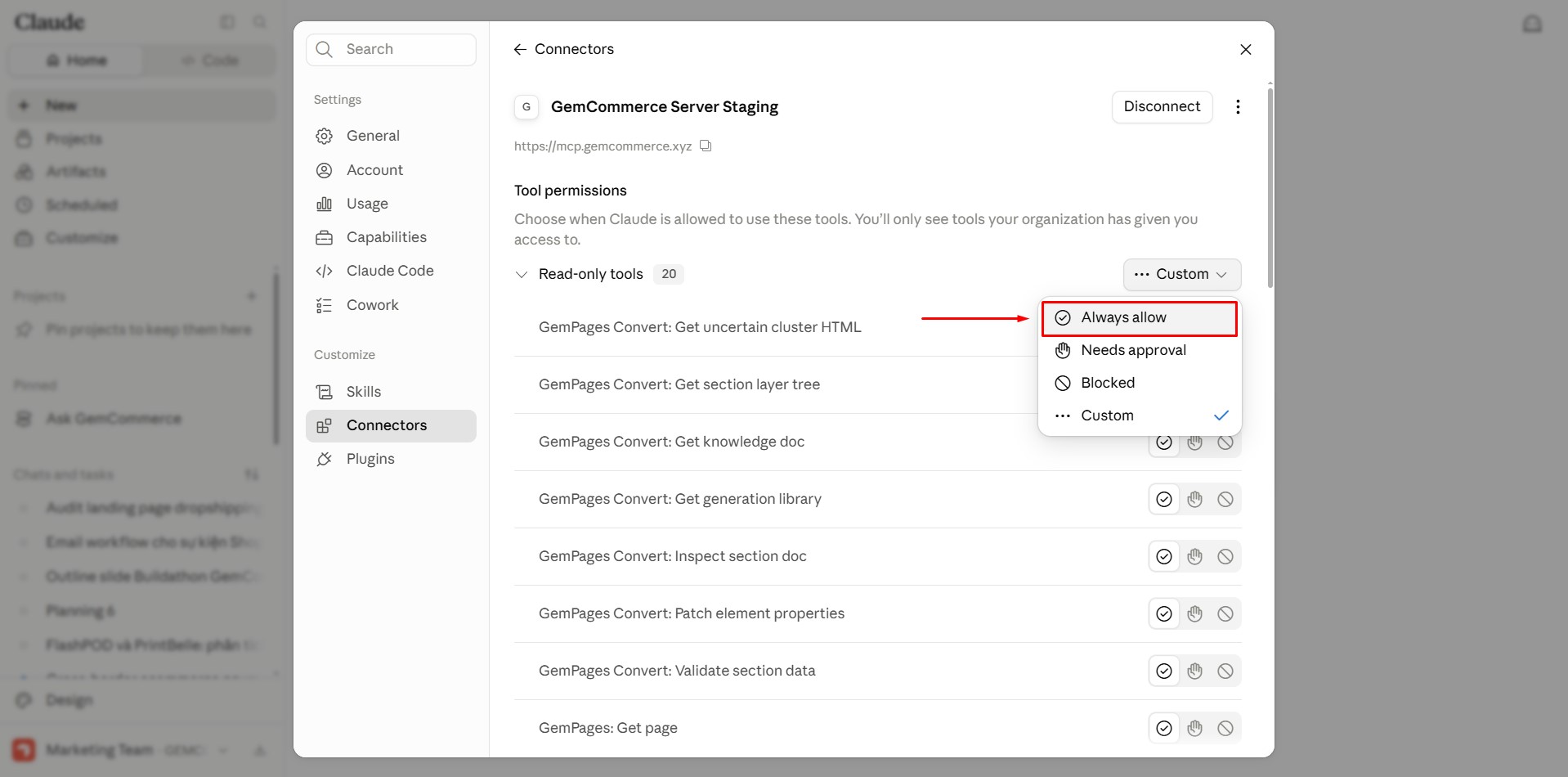
Tip 1: Allow GemCommerce MCP Tool Calls
Claude asks for permission before using an MCP tool by default. Since the Content Research workflow requires many tool calls, these prompts can repeatedly interrupt the process.
To allow GemCommerce MCP tool calls:
- Open Claude Code in the Claude Desktop app.
- Click Customize in the left sidebar.
- Go to Connectors → GemCommerce MCP.
- Open Tool permissions.
- Set the required GemCommerce MCP tools to Always allow.
Tip 2: Use Auto Mode for Safe Bash Commands
The workflow uses Bash commands to manage research files, article drafts, quality-control results, and the final report. When Claude requests approval for every command, the workflow may stop frequently.
In Claude Code inside the Claude Desktop app, set the conversation to Auto mode. Claude can then run commands it considers safe without requesting approval each time.
Review your environment’s permission settings before enabling Auto mode, especially when the workflow can access Shopify data or local files.
Content Research Limitations and How to Handle Them
The workflow can automate many research tasks, but it still depends on source accessibility, available evidence, and the capabilities of the connected AI environment.
1. What to Do When Competitor or Review Websites Block Access
Competitor websites, marketplaces, and review platforms may use anti-crawling systems that prevent the AI agent from retrieving public pages through standard web requests.
This can create gaps in:
- Competitor content
- Marketplace reviews
- Customer discussions
- Advertising examples
If an important source cannot be accessed, the agent should disclose the limitation rather than treat the research as complete.
A browser-based connector may improve access because it operates through a real browser. Review its official setup and security guidance before installing or authorizing it.
You can also manually export relevant content or reviews and provide them as local files.
2. What to Do When the Workflow Cannot Find Enough Reviews
A lack of collected reviews does not necessarily mean customers have no opinions about the product.
Reviews may:
- Appear on inaccessible platforms
- Use a different product name
- Exist only inside private customer systems
- Be distributed across multiple regional listings
- Be unavailable because the product is new
When public review coverage is limited, provide first-party evidence directly or interpret the customer analysis more cautiously.
Avoid presenting category-level patterns as verified findings about your own product.
3. Why the Full Workflow Requires Local File Access
A complete Content Research run creates and reads multiple research files, article drafts, quality-control results, and the final HTML report.
For this reason, it should be run in Claude Code, Claude Cowork, or another compatible environment with local file access.
A chat-only interface may help discuss the research strategy or analyze a limited amount of supplied information, but it cannot reliably execute the complete file-based workflow.
4. When to Run the Full Workflow or a Shorter Research Task
Use the full pipeline when you need evidence-backed positioning and multiple content assets.
Choose a shorter research task when your objective is narrower:
- Need a competitor shortlist? Run competitor research only.
- Need authentic buyer language? Collect and analyze reviews.
- Already have the raw evidence? Generate the report directly.
- Need research, personas, and multiple content drafts? Run the full workflow.
Matching the workflow to your immediate objective saves time and prevents unnecessary outputs.
Things to Know Before Running the Content Research Workflow
The Content Research workflow involves product data, competitor pages, customer reviews, audience analysis, article drafts, and multiple local files. Review the following points before starting a full run.
1. Tell the AI to Use GemCommerce MCP
Begin your prompt with: Use GemCommerce MCP
State this instruction explicitly so the AI connects to the correct tools instead of choosing another research method.
For example:
Use GemCommerce MCP to research content for Marine Collagen Powder for the US market.
2. Use an AI Environment With Local File Access
Run the workflow in Claude Code, Claude Cowork in the Claude Desktop app, or another compatible environment with local file access.
A full run needs to read and write files such as:
- Shopify product data
- Competitor research
- Customer reviews
- Audience analysis
- Buyer personas
- Article drafts
- Quality-control results
- The final HTML report
A chat-only AI environment without local file access cannot reliably complete the full workflow.
3. Choose a Model That Can Handle a Long Research Run
Use a model that can comfortably handle at least 200K context, such as Claude Opus 5 with Medium or High reasoning effort.
The workflow accumulates a large amount of information as it progresses. A model with limited context or reasoning capacity may lose track of earlier customer findings, competitor data, or product details before article generation begins.
4. Stay Near the Conversation for the First 5 to 10 Minutes
During the first run, the AI may ask for permission to browse the web, access a file, or use an MCP tool.
Stay near the conversation during the first 5 to 10 minutes so you can respond to these requests. Otherwise, the workflow may remain paused until the required permission is granted.
You can reduce repeated interruptions by setting approved GemCommerce MCP tools to Always allow and using Auto mode for safe local commands.
5. Allow Up to 30 Minutes for a Full Run
A full Content Research run can take up to 30 minutes.
The workflow does more than produce an article from a product description. It studies:
- Language customers use repeatedly
- Positive and negative sentiment
- Purchase motivations
- Reasons customers hesitate or leave
- Problems customers want to solve
- Competitor positioning
- Marketplace and review evidence
- Differences between buyer groups
The AI then uses these findings to develop personas, content angles, and multiple article formats.
Research sources also need to be accessed carefully. Sending too many requests to competitor, marketplace, or review websites within a short period can trigger anti-crawling systems and leave gaps in the findings.
When you only need a competitor shortlist or review analysis, use a shorter entry point instead of running the complete workflow.
6. Provide Detailed Product and Offer Information
The content becomes more specific when the AI receives strong product information at the beginning.
Include details such as:
- A complete product description
- Target country and audience
- Core product features
- Clear differences from competing products
- Price or price range
- Approved customer testimonials
- Money-back guarantees or warranties
- Certifications
- Third-party testing or endorsements
- Claims that require qualification
- Claims that must not appear
A prompt that only says “research a fish oil supplement” gives the AI limited context. It may produce useful category-level content, but the drafts are more likely to rely on broad messaging.
Specific product and offer details allow the AI to develop content around credible differences instead of filling gaps with general category claims.
7. Review Coverage May Be Incomplete
Public review platforms do not always provide enough accessible data.
Reviews may:
- Sit behind access restrictions
- Use another product name
- Appear across several regional listings
- Exist only in private customer systems
- Be limited because the product is new
When the AI cannot collect enough reviews, it should report the gap instead of padding the findings with unsupported information.
You may be asked to provide first-party reviews, survey responses, support conversations, or exported customer data.
8. Some Websites Block AI-Based Access
Some competitor websites, marketplaces, and review platforms detect and block automated requests, even when their pages are publicly accessible in a regular browser.
When this happens, the workflow may miss:
- Competitor page content
- Product details
- Marketplace reviews
- Customer discussions
- Advertising examples
For better access to these sites, you can add the Chrome DevTools MCP server. It uses a real Chrome browser instead of relying only on standard web requests.
Run:
claude mcp add chrome-devtools –scope user npx chrome-devtools-mcp@latest
This setup requires:
- Node.js LTS
- npm
- Google Chrome installed locally
See the Chrome DevTools MCP setup guide for installation details and available modes.
Access restrictions may still apply. Use only sources you are permitted to access and follow each website’s terms.
9. You Can Use Review Data From Other Tools
GemPages MCP does not require all research data to be collected within the workflow.
When your team already uses a review-scraping or customer-research tool, export the relevant data and provide it directly to the AI.
For example:
Here are the reviews we collected for this product. Use these files instead of collecting new reviews, then complete the customer analysis, buyer personas, article drafts, and final report.
The workflow can apply the same customer-insight analysis and content process to existing data.
This approach is particularly useful when:
- Your paid tool has better access to a marketplace
- Your team has already cleaned and verified the data
- Reviews come from a private customer system
- The public sources available to the AI are incomplete
- You want the workflow to focus on analysis rather than collection
10. Use a Shorter Research Task When You Do Not Need the Full Package
A complete run is intended for projects that need research, personas, content angles, several article drafts, and a final report.
Use a shorter entry point when your question is more focused:
- Competitors only:
“Find competitors for [product].” - Reviews only:
“Collect and analyze reviews for [product].” - Report only:
“Generate a research report using the attached data.” - Full research:
“Do content research for [product].”
Choosing the task that matches your immediate goal saves time and avoids generating files or articles your team does not need.
Next Step: Turn Your Content Into an HTML Landing Page
A full Content Research run gives you customer insights, buyer personas, content directions, and multiple draft articles. Once your team has reviewed and approved an advertorial, listicle, or comparison article, you can move it into the next GemPages MCP workflow: Content to HTML.
The Content to HTML workflow reads the finished article, identifies its content type, and matches it with a suitable structure from the GemPages HTML template library. It then applies your available brand colors and typography and creates a complete landing-page.html file for review.
You can convert one approved article or process a full batch. When running a batch, GemPages MCP handles the articles sequentially and avoids reusing the same template, helping the resulting pages remain visually varied.
The HTML output is not automatically created or published in GemPages. Review the page in your browser, resolve any bracketed placeholders, and request revisions before moving it into the HTML to GemPages workflow.


Thank you for your comments